




Google Search Console (GSC) is an essential tool that helps multifamily properties understand how their website performs organically in Google search results. By verifying your RentCafe website in GSC, you’ll be able to see which search terms bring visitors to your site, identify pages that aren’t showing up in search results, catch technical problems that might be hurting your visibility, and evaluate your site’s overall performance.
For property management companies, having this insight means you can make smarter decisions about your digital marketing, specifically Search Engine Optimization (SEO). While the verification process involves a few technical steps, this guide will walk you through exactly how to verify GSC on your RentCafe backend.
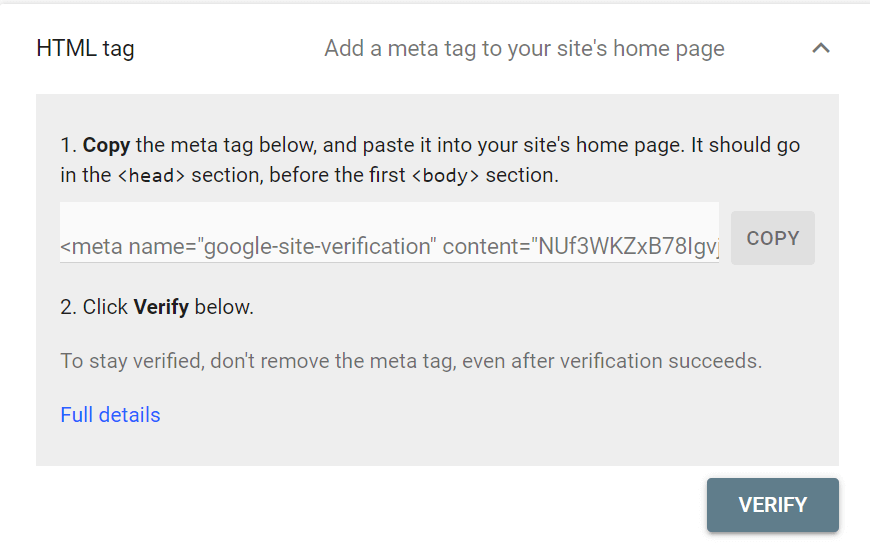
How to Find Your Google Search Console Verification Meta Tag
- Digible will provide clients with the required meta tag, or HTML Tag, from GSC
- If needed for your own verification purposes, you can:
- Visit Google Search Console and select Add New Property
- Enter your property website under URL Prefix, then click Continue
- Find the HTML Tag under the Other Verification Methods section
- OR visit Google Search Console and select your property from the Search Property dropdown
- Click Settings, then Ownership Verification
- Find the HTML Tag under the “Other Verification Methods” section
How to Access the RentCafe Dashboard for SEO Settings
- Log in to the RENTCafe dashboard and select your property
- Find the “Property Configuration” menu on the left and click SEO – SEO Dashboard – Analytics Tracking
- On the Analytics Tracking page, find the “Other Tracking” section and click + Add New Item
How to Add the Google Search Console Meta Tag in RentCafe
- Complete the “Edit External Tracking” section as follows:
- What would you like to track?: Other Remarketing Campaign
- Where should your tracking code be on the page?: Between the <head> tags
- What pages would you like to track?: All Pages
- Paste your code here: [insert GSC meta tag]
- Please enter a description of the item you want to track: [Digible – GSC]
- Click Save
How to Confirm Successful Google Search Console Verification
If you’ve made it this far, you’ve successfully verified your RentCafe website in Google Search Console. With GSC now connected, you can begin monitoring your organic search performance, identifying opportunities to improve your rankings, and ensuring Google can properly crawl and index your property pages. Remember to check GSC regularly for any coverage issues, performance trends, or enhancement opportunities.
If you’re already a Digible client, we’re here to guide you through the verification tag placement process on your RentCafe backend. Once you’ve added the tag, our team will handle the verification in GSC and take care of all ongoing monitoring and optimization. Your account team, specifically your SEO Strategist, proactively tracks your search performance and addresses any issues that arise, so you can focus on leasing apartments!
If you’re verifying GSC independently and want guidance on interpreting your data, optimizing your search strategy, or addressing technical challenges, Digible can help! We are an award-winning multifamily marketing agency offering flexible SEO packages that can turn GSC insights into actionable strategies that drive more organic traffic and qualified leads to your communities. Contact the Digible team to learn more about our organic marketing offerings.